
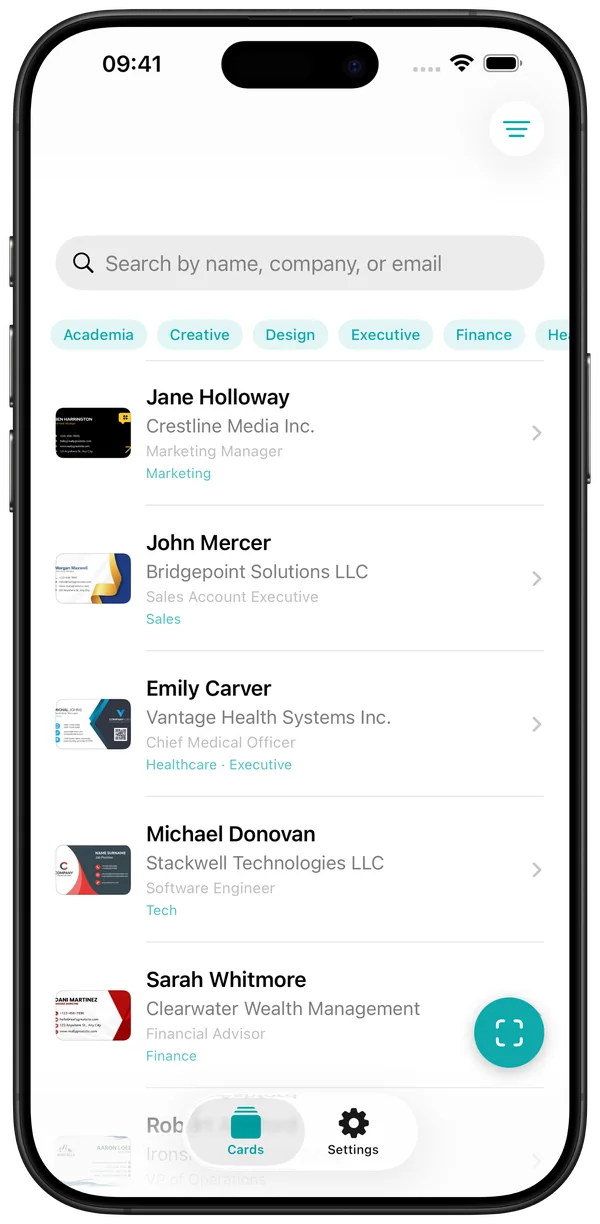
Freelancers meet few people compared with a sales team, but each one matters. Scard keeps those contacts in a searchable list on your iPhone and iPad, with a note on who they are and how you met. There is no account, and you export a file only when you want to.
- No account or sign-up; your data stays on your devices
- Cards sync between iPhone and iPad through your own iCloud
- Notes record the project, referral source or what they might need
- Export as CSV, PDF or vCard whenever you want a copy
A small network that you need to remember well
A freelance designer, translator or consultant may meet thirty new people in a year, and perhaps five of them turn into paying work. The rest are referrals waiting to happen: the person who introduced you, the agency contact who said to get in touch next quarter, the co-working neighbour who needs a developer eventually. A full CRM is too heavy for that, and a pile of cards is too loose.
Scard sits in between. Scan the card after the coffee or the workshop, and use the note field to record why you met and what was said: referred by Anna, wants a rebrand next year, prefers email. Add one or two tags, such as a client, a lead or a referrer, and the year. Searching by name or company will bring it back months later, and the card also appears in Spotlight on the home screen.
A practical habit is a short review once a quarter. Open the list, filter by the lead tag, and look at the notes. Anyone you promised to contact next quarter is easy to find, and you can message them with something specific instead of a vague hello. Remove the cards that no longer matter, so the list stays small enough to scan by eye.
The advantage of keeping it this simple is that you will keep it up. A tool that wants fifteen fields per contact does not get used by someone who also does their own invoicing.
iPhone in the field, iPad at the desk
Many freelancers do their client work on an iPad or have one on the desk. Scard runs on iPhone and iPad, and your collection syncs between them through your own iCloud. You scan with the iPhone camera, then review, tag and organize on the larger screen in the evening. The iPad page describes how the layout works in all orientations.
There is no Scard account to create or forget the password to. Sync happens through your Apple ID, so there is nothing to log into on the second device. If iCloud is not available for any reason, the app keeps the data on the device and syncs once it is reachable again.
This also fits a mobile working style. You can scan at a client's office with no wifi, since text recognition runs on the phone, and sort things out later.
Export when you need it, not before
Not every freelancer wants their contacts in a spreadsheet, and Scard does not push you there. Export is a tool for specific moments. You may want a CSV to import into the invoicing or project software you already use, a PDF of the collection as a plain backup, or a vCard of a single person to send to a client who asked for an introduction. See the export formats page for what each file contains.
You can also save a card to iPhone Contacts, in a group if you like, so the person's name appears when they call. For a client you will work with for years, that is often the only step you need.
Because the CSV opens correctly in Excel, accents in names do not get scrambled. That detail matters if your clients are in several countries. The guide to organizing cards digitally gives a few more ideas for a minimal system.
Paying for it as a freelancer
You get 2 saved scans free to see whether the app fits. Because freelancers scan few cards, many will find the one-time lifetime purchase a better fit than a recurring plan, though a subscription is available if you prefer. Saving to Contacts, export, tags and search are not behind Pro. Read the pricing explanation for the details, including how to restore a purchase on a new device.
If you work with a few long-term clients, the cost question is simple: you pay once, or you try a plan for a busy season and cancel it in iPhone Settings under Subscriptions. Either way the cards you saved remain yours, and you can still search and export them.
Scard is a contact keeper, not a project or invoicing tool. It has no client portal and no team sharing. Free scans are limited to 2; unlimited scanning needs Scard Pro.
How to set up Scard as a freelancer
- Scan after the meeting
Scan the card with your iPhone and review the fields.
- Note how you met
Write the referral source or project idea in the notes field.
- Add a simple tag
Tag the person as client, lead or referrer, plus the year.
- Review on your iPad
Open Scard on the iPad later to sort and search. Export a file only when you need one.
Frequently asked questions
Do I need an account to use Scard?
No. There is no sign-up. Sync between your devices uses your own iCloud.
Can I use it on both iPhone and iPad?
Yes. Scard runs on both, and your collection syncs through iCloud.
Is Scard a CRM for freelancers?
No. It stores and organizes contacts with notes and tags. For anything more, export a CSV or vCard into the tool you use.
Do I need Pro if I scan only a few cards?
You can save 2 scanned cards for free. To scan more you need Pro, and the one-time lifetime purchase is an alternative to a subscription.