

Scard helps agents turn the cards they collect at open houses, viewings, notary appointments and networking events into organized contacts. Tag each card by property or lead stage, add a note about what the person wanted, and export a CSV for your CRM when you are back at the office.
- Tag cards by property address, lead stage or neighbourhood
- Add a note about the budget, timeline or what the visitor asked
- Exports a CSV for your CRM; there is no direct CRM integration
- Works offline, which helps in basements, new builds and rural viewings
The open house problem
An open house produces a small, uneven pile of information. A few visitors sign your sheet, and some of those scribbles are unreadable. Others hand you a card instead, often because they are another agent, a mortgage broker or a neighbour who is curious. The sign-in sheet gets typed up days later, if at all, and the cards go into a jacket pocket.
Scard does not replace the sign-in sheet for visitors who do not have a card, and it is not a form. What it does is capture the cards you are given in a way that keeps the context. When a visitor hands you a card, you scan it, tag it with the property, for instance the street name, and add a one-line note: first-time buyer, wants a garden, needs to sell first. That takes less time than finding a pen, and the note is attached to the contact when you save it.
If you would rather not hand people a clipboard, you can also ask them for a card or offer to scan theirs on the spot. Some agents find that this feels more personal than a form, and it avoids transcribing handwriting. Check your local rules on how you may store and use what you collect before relying on this.
Tags that follow a deal, not an event
A real estate agent's contacts move through stages over weeks or months, which is different from a trade show where everyone gets the same follow-up. Scard tags are free-form, so you can build a small system that matches your pipeline. One tag for the property the person saw, one for the stage, such as new, viewing booked or waiting on finance, and one for the type of contact: buyer, seller, broker, notary, contractor.
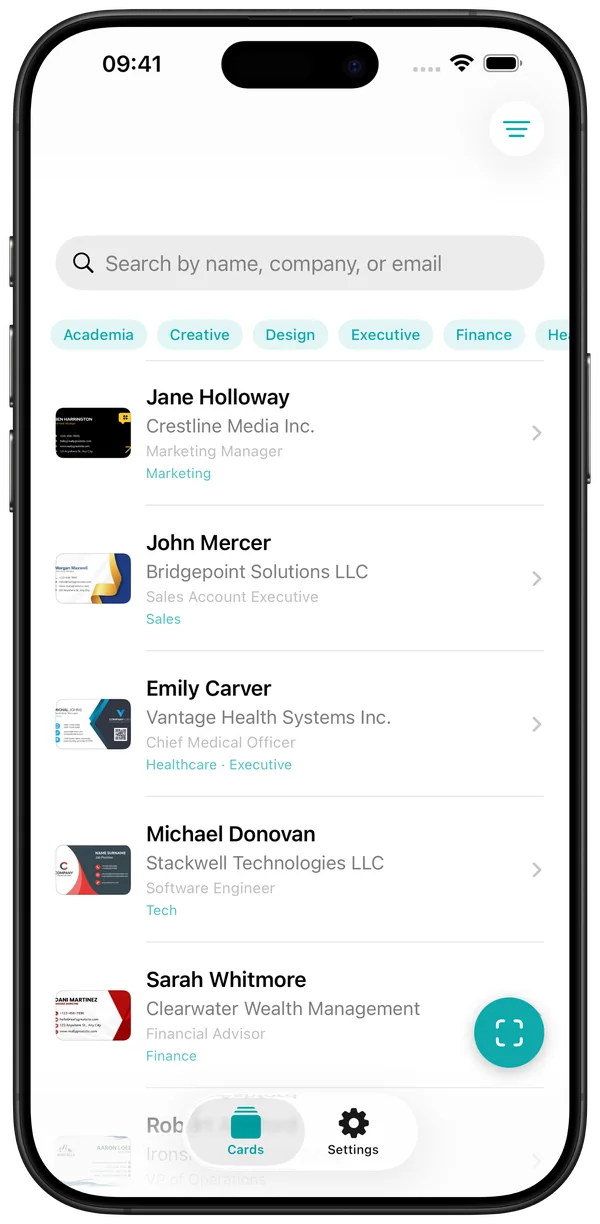
You can filter the list by any tag and search by name, company or email. If an agent from another firm calls about a buyer, you can type her name and see the note you wrote when you met. If a seller asks who viewed the house on Saturday, filter by the property tag and read the notes. Change the stage tag as things move, and the list becomes a working view of where you stand. For more on building a tagging scheme, see the tags and search page.
Cards are also searchable from the iPhone home screen through Spotlight, which is useful when you are standing outside a property and need a number.
Follow-up and getting into your CRM
Follow-up is the part that earns the commission. The note you wrote at the open house tells you what to say in the message the next day, so you are not sending a generic template. Save the card to iPhone Contacts, in a Contacts group such as the property name, and you can call or message from your usual apps.
Scard has no direct integration with any CRM. The route into one is a file. Export the whole collection as CSV from Settings, or send single cards as vCard, and import them into whatever your agency uses. The CSV opens correctly in Excel with accented characters, which matters when you work with names from many countries. The guide on getting scanned cards into Outlook and a CRM walks through the import step, and the HubSpot import post is an example of a specific tool.
Do the export on a regular day, for instance every Monday for the previous weekend. Because the file carries your tags, you can filter the property or stage in the spreadsheet before you import.
Using it on the move
Viewings happen in places with bad reception: new builds with no connection, cellars, farms. Text recognition runs on the iPhone, so scanning works without internet, and an on-device parser sorts the fields. Online, an AI step sorts the recognized text instead, and you review every field before saving either way. See the offline page for the details.
If you work with a team, remember that Scard does not share a collection between different people. Cards sync across your own iPhone and iPad through your iCloud, and sharing with colleagues happens through exports.
Scard does not run sign-in forms or share a collection between agents, and it has no CRM integration. Observe your local data protection rules for the personal data you collect. Free scans are limited to 2; unlimited scanning needs Scard Pro.
How to log open-house contacts with Scard
- Scan the card
When a visitor hands you a card, scan it and crop it to the card edges.
- Add the context
Write a one-line note and add tags for the property and the lead stage.
- Save to Contacts
Save to iPhone Contacts, choosing a group such as the property name.
- Export for your CRM
Once a week, export the collection as CSV and import it into your CRM.
Frequently asked questions
Can Scard replace an open house sign-in sheet?
No. It captures business cards that visitors give you. For visitors without a card, you still need your usual way of collecting details.
Can I tag contacts by property?
Yes. Tags are free text, so you can use an address, a lead stage or any label, and filter your list by them.
Does Scard connect to my CRM?
Not directly. You export a CSV or vCard and import it into your CRM.
Does it work in a property with no signal?
Yes. Text recognition runs on your iPhone, so scanning works offline.